

26 October 2026
How to Use the CWGC and For Evermore Apps to Explore War Graves and Discover Stories
Did you know the Commonwealth War Graves Commission has free mobile apps you can use to enhance your war graves experience?
From virtual tours to having our casualty database and records in your pocket, the CWGC and For Evermore Apps open up new avenues for you to explore our sites and the people we commemorate.
Get to know Commonwealth War Graves’ apps here.
At a Glance: What Can You Do With the CWGC Apps?
With CWGC apps, you can:
Download the CWGC War Graves and For Evermore apps for free
Search for CWGC cemeteries and memorials by name or location
Discover war graves near you using your phone's location
View available cemetery information and maps
Follow selected virtual or in-person guided tours
Discover personal stories linked to commemorated individuals
Explore places and stories before, during or after a visit
What Is the Difference Between the CWGC War Graves app and For Evermore app?
There are some key differences between the two CWGC apps.
The CWGC War Graves App primarily helps users discover and locate cemeteries and memorials. It supports searches by cemetery name, location or postcode, and offers mapping and navigation options too.
The For Evermore App focuses on exploring the stories of people commemorated by CWGC and experiencing selected sites through guided tours. It also allows users to scan headstones to check whether a story is available.
Here’s a handy guide to which app suits which activity:
Activity | App |
Find a CWGC Cemetery near you | CWGC App |
Search for a cemetery by name or postcode | CWGC App |
Navigate to a cemetery or memorial | CWGC App |
Explore a cemetery with a guided tour | For Evermore |
Discover personal stories | For Evermore |
Scan a headstone to look for a story | For Evermore |
Explore selected sites virtually | For Evermore |
How to Use the CWGC War Graves App to Find Cemeteries and Memorials
Here’s how to use the CWGC App to locate war cemeteries and memorials around the world.
Step 1: Download the CWGC War Graves App
Download the CWGC App from the app store of your choice. The app is free and is available for both Android and iOS.
Step 2: Search for a cemetery or memorial
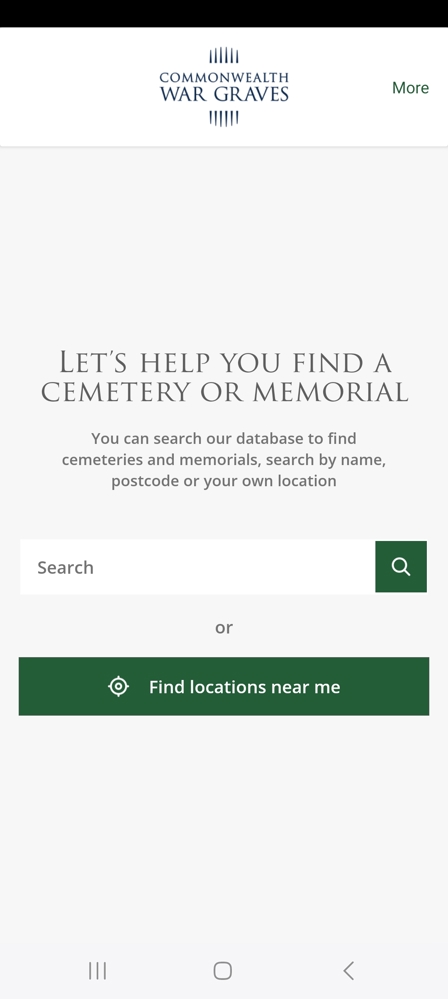
Opening the app, you will see a search bar. Use this to search for sites by name or by location (town or postcode).
You will have to give the app permission to see your location to do so.
In this case, we have searched for “Brookwood”.
Step 3: Find war graves near your location
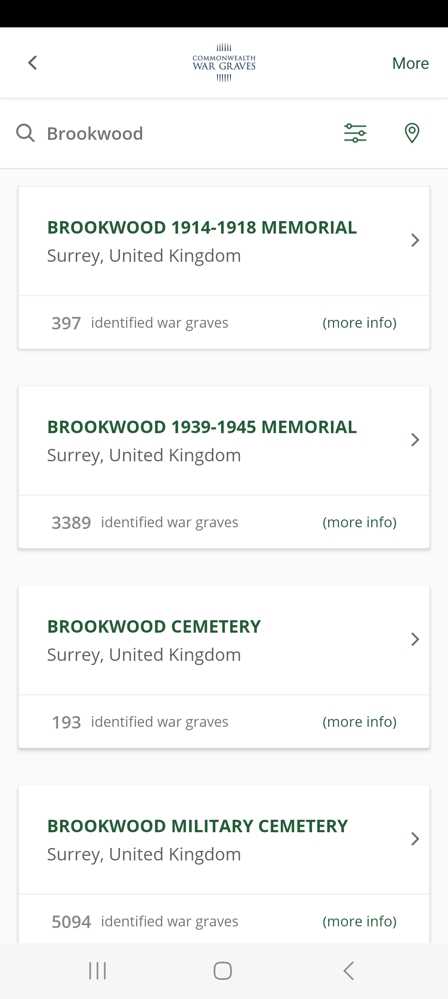
Your search results will depend on the manner of your search.
If you searched by location or postcode, the results page will show all cemeteries and memorials related to that term.
In this case, we searched with “Brookwood”. This has given us four results based on that keyword:
Brookwood 1914-1918 Memorial
Brookwood 1939-1945 Memorial
Brookwood Cemetery
Brookwood Military Cemetery
The default is a list view, but you can also select a map view.
The filter will allow you to further refine your search, with country, locality and number of casualties search options available.
Step 4: View cemetery information and maps
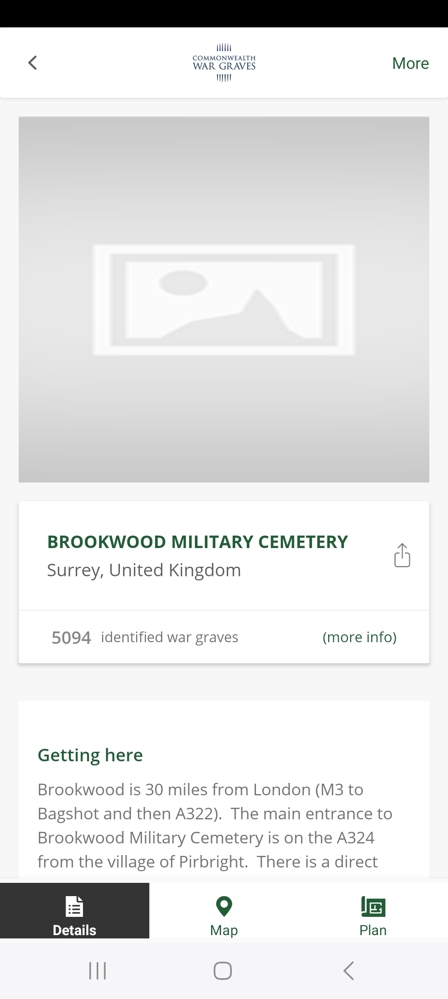
Tap the cemetery or memorial you were searching for.
We’ve tapped “Brookwood Military Cemetery”. This takes us through to the cemetery or memorial page.
Here, you’ll find lots of useful information, including:
How to get there, including postcodes or equivalent
Visiting information such as opening times and accessibility
Historical information
Links to navigate to the CWGC website to learn more about the people commemorated there (this will take you out of the app)
A map view is also available.
In some cases, a cemetery plan may be available too, featuring the locations of headstone plots and rows or memorial panels. Use these to help locate specific burials or commemorations on-site.
Step 5: Navigate to your chosen location
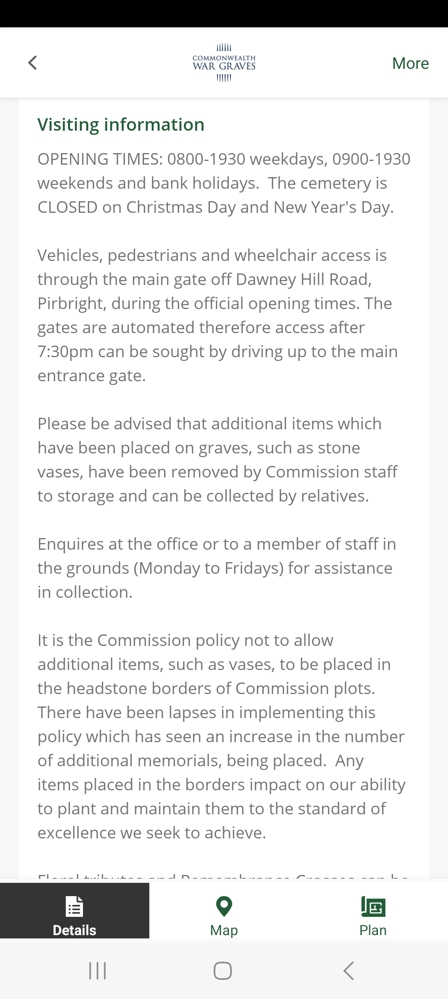
You can use the Getting Here information to plan your journey. Each location’s postcode or country equivalent is available, where we have it.
Sat-nav services such as Google Maps or Waze are available to navigate you to CWGC sites.
How to Find War Graves Near You Using the CWGC App
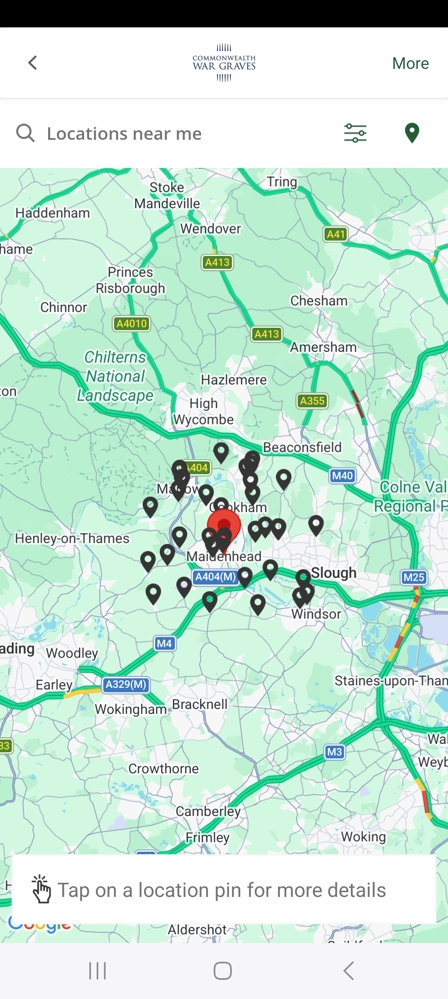
Alternatively, you can search via GPS to find CWGC cemeteries, memorials, and war graves near you by tapping the “find locations near me button”.
This is great for exploring your local history, finding CWGC cemeteries and memorials on the former First World War battlefields of the Western Front, or seeking out smaller, lesser-known locations when out and about.
Searching for war graves near you
If searching via GPS, you will be given a list of CWGC locations, including war graves, cemeteries, and memorials, near you in a 10-mile radius.
Searching by your location is a great way to discover war graves near you!
Discover smaller cemeteries and memorials
Did you know there are over 170,000 war graves in the United Kingdom alone?
While you’ll find thousands of headstones in purpose-built CWGC cemeteries such as Brookwood Military Cemetery or Cannock Chase War Cemetery, many are found in local churchyards, cemeteries, and burial grounds.
Likewise, if you are on a battlefield trip to Northern France or Flanders, you may wish to search for smaller sites. There are over 400 CWGC sites on the Somme, for example.
Searching via GPS can reveal smaller, interesting sites that can be overlooked.
Using the CWGC Apps to Plan a Visit to War Graves in France, Belgium and Beyond
You can use our apps to support your trip to France, Belgium, and CWGC sites around the world.
Find cemeteries and memorials before you travel
The CWGC app contains location information for all our sites, including all 3,572 in France and Belgium.
Download the CWGC App and filter by your country of choice, whether that be France or Belgium, or Thailand, Singapore, and beyond.
This way you can get location and navigation information, helping you plan your journey in advance.
Explore sites and stories before your visit
With the For Evermore app, you can virtually tour a selection of sites before your visit.
This way, you can familiarise yourself with the cemetery or memorial, learn more about its historic context, and uncover stories of the people commemorated there, in advance.
Use the apps while you visit
The For Evermore app has been designed for use in our cemeteries.
From curated tours to headstone scanning, to stories of those commemorated at particular sites, it’s the ideal visitor’s companion.
But the CWGC app is also useful when out and about.
For example, you can use it to access our records and find specific burials or commemorations within a site.
Alternatively, you can use the search by GPS feature to find more war graves and CWGC locations near you.
Continuing your journey when you get home
You can continue to use our apps to continue your war graves journey when you get home.
Perhaps you’ve seen a headstone or personal inscription and want to know more about the person; maybe you want to research their background and create a story.
Use our records and apps to continue your explorations.

Want more stories like this delivered directly to your inbox? Sign up for our newsletter for regular updates on the work of Commonwealth War Graves, blogs, event news, and more.
Sign UpHow to Use the For Evermore App to Discover Personal Stories
The For Evermore App, designed in partnership with Memory Anchor, allows visitors to our sites to discover personal stories of people commemorated there.
Through a combination of augmented reality technology, smart satellite mapping, and access to our records, the For Evermore App offers virtual tours of select CWGC sites worldwide.
Curated stories of service personnel are available too, revealing the real individuals behind the names etched in headstones and carved into memorial panels.
Here’s how to find personal stories on the For Evermore App.
Step 1: Download the For Evermore App
Download the For Evermore App from the app store of your choice. It is available for free for both Android and iOS.
Step 2: Explore the available guided tours
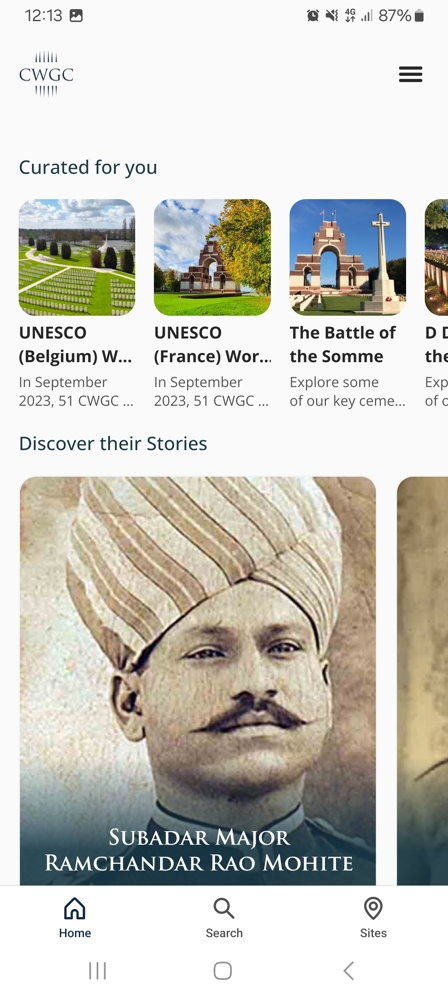
The app home screen offers multiple options, including curated collections of tours, select stories, different cemeteries and memorials to explore, and map access.
You will also find “Search” and “Sites” functions. Search allows you to search all the information in our app, ranging from records, stories, tours, and collections.
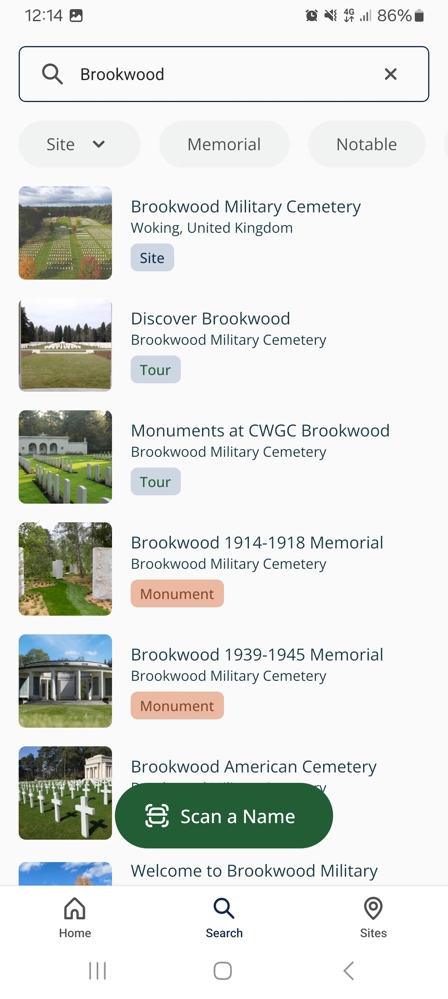
We will select “Sites” and then search for “Brookwood Military Cemetery”.
Tapping the search result will take us to the Brookwood For Evermore page. Here, we can see it has 3 tours available.
We will tap on the “Discover Brookwood” tour.
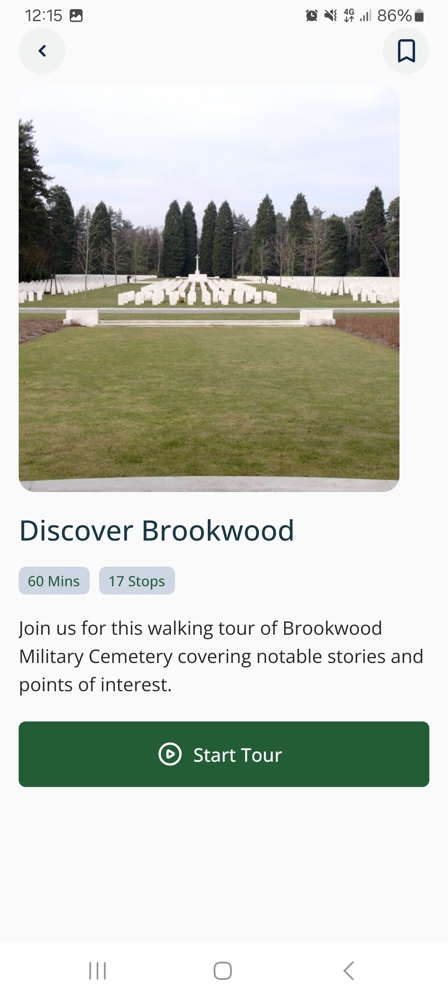
These tours are designed to enhance your visitor experience on the ground. Notice this tour has 17 stops and will take approximately 60 minutes.
If you can’t make it in person, you can still take the tour virtually. Tap each stop arrow to move from stop to stop.
To begin your tour, tap the “Start tour” button.
This will take you to a satellite view of the cemetery with the tour path and stops mapped out.
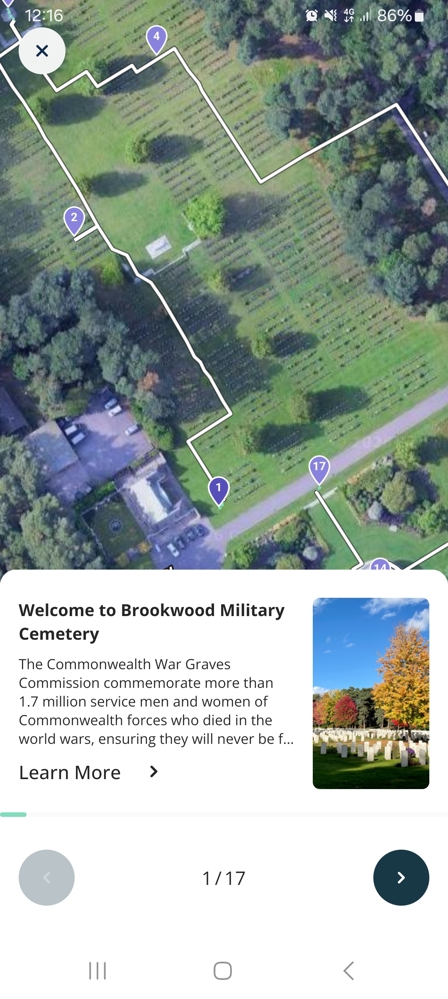
Each tour stop will feature historical information about the site, a casualty story of a person commemorated there, or an interesting feature. You can click on each tour stop pin to bring up additional information, such as casualty biographies.
Step 3: Discover stories connected to a cemetery or memorial
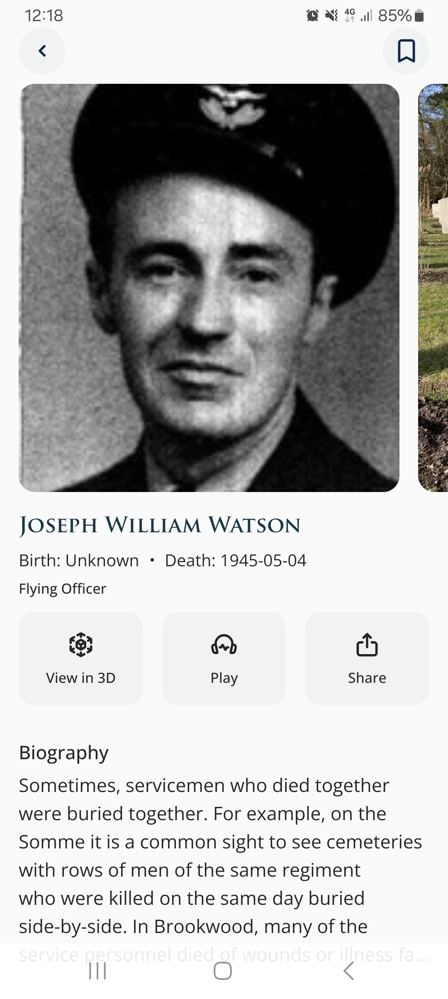
Our For Evermore tours feature stories of the people commemorated on-site so you can learn more about them directly at their place of burial or commemoration.
If you tap on their tour stop, you will be taken through to that casualty’s individual page. Their biography will be available to read with an audio option also available, as well as additional information, such as unit, rank, honours & awards, and so on.
As well as experiencing their stories on a virtual tour stop, you can explore points of interest or casualty stories through the For Evermore App.
Go back to the cemetery page and tap “Site Records”. Here, you will be able to search through all the records available at a particular site. Tap “Notable” to bring up casualties with full biographies.
Step 4: Scan a headstone to find out more
The For Evermore app uses augmented reality to scan headstones and memorial panels in real time.
Scanning a name will bring up that individual’s CWGC records, containing all available information we have on them, such as ranks, units, date of death, honours & awards, and so on.
Please note that not every casualty has a complete biography, but each individual’s CWGC records are available through the For Evermore app. CWGC records are not military service records and contain information relating to commemoration only.
Step 5: Continue exploring stories online
The For Evermore app is linked to For Evermore: Stories of the Fallen, our online digital stories archive.
Here, you’ll find tens of thousands of stories of Commonwealth servicemen and women of the First and Second World Wars commemorated by Commonwealth War Graves.
Stories on the For Evermore website are also linked to sites, so browse away to find bios and stories that may not be on the For Evermore App.
Explore CWGC Cemeteries and Memorials Through Virtual Tours
As we spoke about earlier, the For Evermore App allows visitors to explore a selection of CWGC cemeteries and memorials anywhere at any time.
How do For Evermore virtual tours work?
For Evermore virtual tours are history-led virtual tours available through the app.
They guide users around our sites, stopping at key locations, such as notable burials and commemorations, cemetery features, places of historic interest, and so on.
Which CWGC locations can you explore?
The For Evermore App contains a selection of the most popular CWGC sites around the world, including:
Tyne Cot Cemetery and Memorial
Thiepval Memorial to the Missing of the Somme
The Ypres (Menin Gate) Memorial
Kanchanaburi War Cemetery
The Cape Town Labour Corps Memorial
Please note that not every CWGC site has a virtual tour in the For Evermore app.
Exploring cemeteries and memorials from home
The For Evermore app allows you to explore some of our most iconic cemeteries and war memorials in the comfort of your own home.
These can be particularly useful for those wanting to research casualties and locations overseas, those with limited mobility needs, or just anyone interested in CWGC sites around the world.
Simply download the app, search for the site of your choice, and get touring.
From a War Grave to a Personal Story: Connecting the CWGC Apps With Records
The apps can help guide you towards specific burials and individuals we commemorate.
Start with a name or cemetery
Begin at the beginning with a name or a cemetery.
You may have discovered a site browsing the app, or have found the name of an individual you wish to know more about in our records.
Explore the official CWGC record
Explore CWGC records by moving from the app to our website.
The Find War Dead tool lets you search our casualty database, which contains the names of each individual commemorated by CWGC.
Here, you can learn more about a serviceman or woman, including their final place of commemoration.
Discover personal stories through For Evermore
You can browse thousands of Commonwealth World War stories on the For Evermore website.
This is our stories archive, where members of the public share their family World War stories.
Read and upload yours today.
Tips for getting the most out of the CWGC and For Evermore Apps
Check your location settings – Ensure your device’s location settings are switched on; otherwise, you will not be able to use certain app functions
Check connectivity – If you are onsite, ensure your mobile data is working. Wi-fi is largely not available at the majority of our sites. Some are also in areas with low signal, so please take that into consideration
Check tour and story availability – Not every CWGC site is available to virtually explore on the For Evermore app. Browse before you visit to avoid disappointment
Author acknowledgements
Alec Malloy is a CWGC Digital Content Executive. He has worked at the Commonwealth War Graves Commission since February 2022. During that time, he has written extensively about the World Wars, including major battles, casualty stories, and the Commission's work commemorating 1.7 million war dead worldwide.
CWGC Apps FAQs
Yes, both the CWGC and For Evermore apps are free to download on Android and iOS.
The CWGC App lets users find war graves nearby. The For Evermore app focuses on storytelling via virtual tours, casualty biographies and more features.
Yes, the CWGC is designed to help you find war graves, cemeteries and memorials in your local area. Search by name, postcode, or location using map-based GPS.
Yes, you can use the For Evermore App to take virtual tours of select CWGC sites worldwide.
The For Evermore app allows you to scan headstones in our cemeteries. Scanning headstones brings up that person's commemoration information and, where we have them, biographies and stories of the people behind the headstones.
No, virtual tours are currently only offered for selected CWGC sites.